Key Takeaways
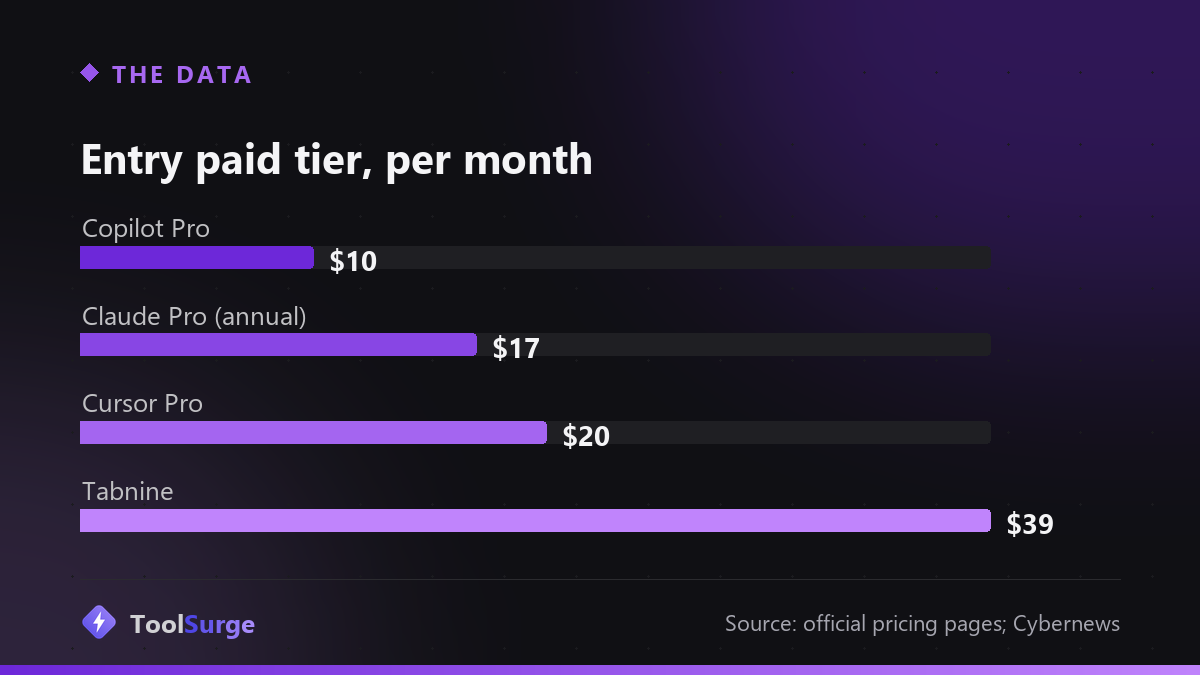
- Official pricing: Copilot Free / $10 Pro / $39 Pro+ / $100 Max; Cursor Hobby free / $20 Pro / $40 per user Teams; Claude Pro $17 (annual) with Max from $100.
- Wiz's "GhostApproval" research found a symlink trust-boundary flaw in six assistants — Amazon Q Developer, Claude Code, Augment, Cursor, Google Antigravity, and Windsurf.
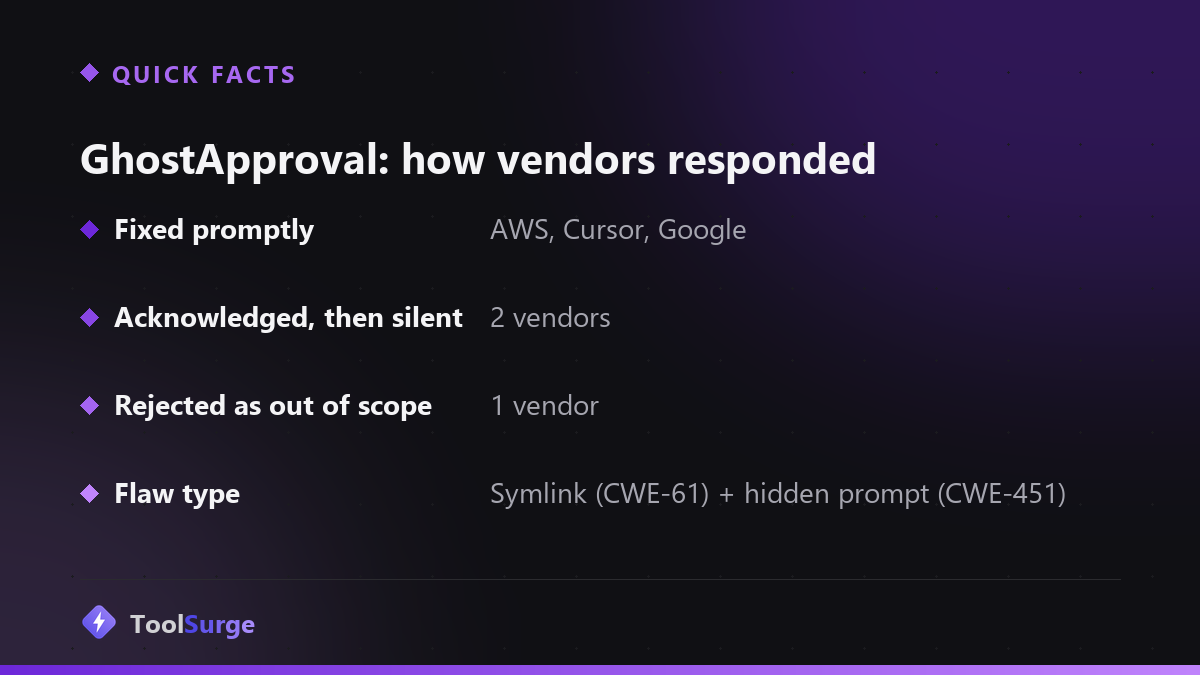
- Three vendors (AWS, Cursor, Google) fixed it promptly; two stayed silent and one called it outside its threat model, per Wiz.
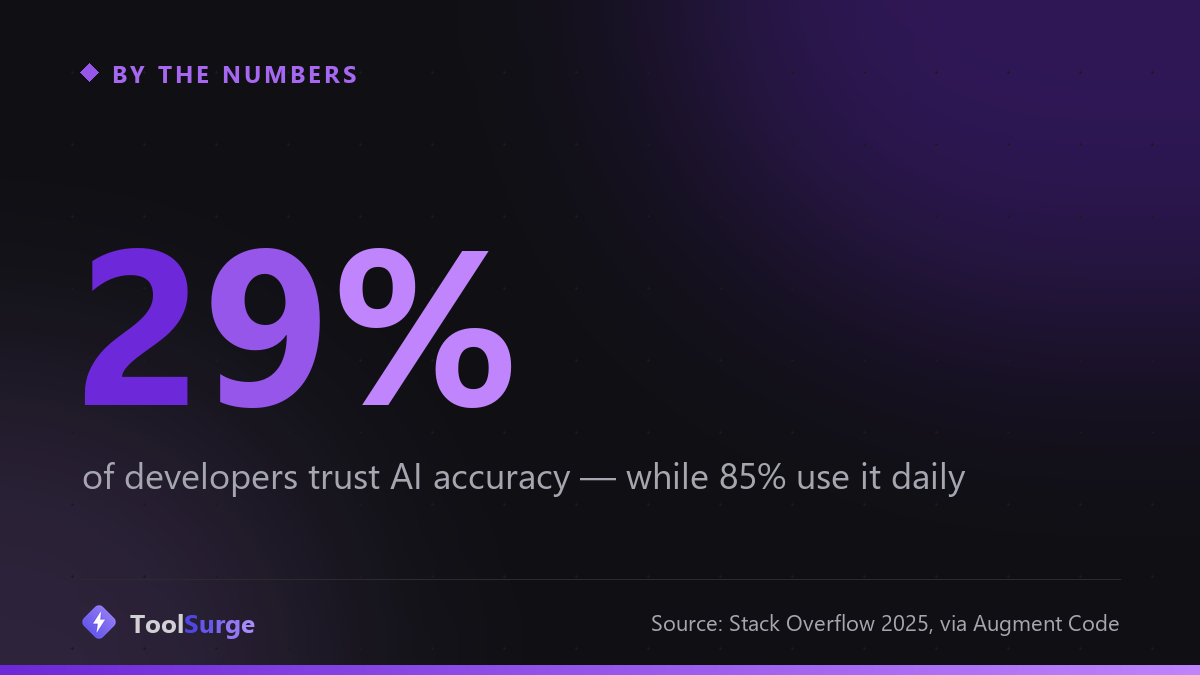
- Adoption and trust are diverging: 85% of developers use AI tools (JetBrains 2025) while only 29% trust its accuracy (Stack Overflow 2025), as cited by Augment Code.
The honest 2026 answer: GitHub Copilot at $10/month is the lowest-friction place to start, Cursor is what people reach for on gnarly codebases, and Claude Code is the one you hand a multi-file job and walk away from. But there’s a second question this year’s roundups mostly skip — whether the approval dialog you click is telling you the truth. In June, security researchers at Wiz found it often isn’t, across six of the biggest assistants. Start with the picks, then read the part about the flaw.
The short list, by what you’re doing
Starting out, or living inside GitHub: Copilot. The free tier gives 2,000 completions and 50 chat requests a month, and Pro is $10 — the cheapest serious entry point in this category, per GitHub’s official plans page. Cybernews called it the best pick for GitHub-native teams. Pro+ ($39) and Max ($100) mostly buy bigger AI-credit allowances ($70 and $200 of credits respectively).
Large, messy codebases: Cursor. Hobby is free, Pro is $20/month, Teams runs $40 per user, according to Cursor’s pricing page; higher individual tiers (Pro+, Ultra) sell multiples of the agent limits. Cybernews rated it the most powerful IDE for complex codebases. The market agrees with its wallet — Augment Code’s roundup cites Cursor passing $2 billion in annualized revenue by March 2026, double its November 2025 figure.
Autonomous multi-file work: Claude Code, bundled into Claude Pro at $17/month billed annually per Anthropic’s pricing page, with Max tiers from $100 for heavy use. Cybernews positioned it as the autonomous option for complex development. Notably, Microsoft made Claude Sonnet the default model for the GitHub Copilot CLI in September 2025 — the company that owns GitHub picking a competitor’s model as its coding backend.
Locked-down enterprises: Tabnine at $39/month, which Cybernews ranked first overall on the strength of a no-train, no-retain policy and fully air-gapped deployment — the only tool in its test that runs with zero internet access.
Learning or prototyping in the browser: Replit, whose Agent 3 extended autonomous runtime to 200 minutes, per Augment Code’s timeline.
What actually changed in 2026
The agentic pivot finished. Every major player now ships autonomous agents rather than autocomplete: GitHub launched Agent Mode with multi-agent workflows in February 2026, Cursor moved background agents onto isolated VMs, and Replit stretched its runtime past three hours, according to Augment Code’s market summary. The evaluation question flipped from “does it autocomplete well?” to “can it plan, execute, and verify a multi-file change without supervision?”
Adoption followed, but trust didn’t. Augment Code cites JetBrains’ 2025 survey putting regular AI-tool use at 85% of developers, against Stack Overflow’s finding that only 29% trust the accuracy of what comes out — with the deepest skepticism among engineers who have 10+ years of experience.
Hackaday’s follow-up review puts a finer point on why. Junior developers, the comparison these tools invite, will tell you when they didn’t understand the task, ask for clarification, or admit they don’t know. The assistants generally won’t — they produce something confident either way. That’s a workflow property, not a benchmark number, and it’s the thing that decides whether a tool saves you time or hands you a mess to debug.
GhostApproval: the approval dialog that lied
Here’s the finding worth your attention. Wiz researchers tested a decades-old trick — symbolic links, CWE-61 — against modern AI coding agents. It worked. A malicious repository could point a symlink outside the workspace, and the agent would follow it and write to the target file, escaping the sandbox and potentially reaching remote code execution on the developer’s machine.
The worse half is what the user saw. Per Wiz, in several cases the agent’s own internal reasoning identified the dangerous target, “yet the confirmation prompt shown to the user conceals this information entirely” — a UI misrepresentation issue (CWE-451) stacked on top of the symlink bug. You approve what looks like a harmless local edit; the agent writes somewhere sensitive.
Wiz reported it to all six affected vendors: Amazon Q Developer, Anthropic’s Claude Code, Augment, Cursor, Google Antigravity, and Windsurf. Three — AWS, Cursor, and Google — fixed it promptly. Two acknowledged receipt and went quiet. One rejected it as “outside our threat model.”
The practical takeaway isn’t to stop using these tools. It’s that the human-in-the-loop safety net is only as good as what the dialog shows you, so treat untrusted repositories as untrusted: clone them somewhere isolated before pointing an agent at them, and prefer vendors that patched fast. The same “who’s accountable when the agent acts for you” question is showing up in consumer products too — see Google’s agentic booking rollout, where the merchant-of-record split was the detail that mattered most.
What happens next
Expect the security bar to become a selling point. GhostApproval was a category-level blind spot rather than one vendor’s mistake, and the split response — three fast fixes, two silences, one refusal — is now public information buyers can price in. Expect sandboxing and path resolution to show up on feature pages next to agent limits.
On pricing, the ladder keeps stretching: Copilot at $10/$39/$100 and Claude at $17/$100+ show the same shape as the consumer chatbots, where the entry tier gets cheaper while a new power tier absorbs heavy agent use. If you’re picking one general assistant rather than a coding-specific tool, our ChatGPT vs Claude vs Gemini comparison covers that decision, and the best AI writing tools guide covers the non-code side.
Quick poll
How much do you let an AI agent do unsupervised?
Per Stack Overflow's 2025 survey cited by Augment Code, only 29% of developers say they trust AI accuracy — even though 85% use these tools.
FAQ
What’s the cheapest good AI coding assistant? GitHub Copilot: free tier with 2,000 completions and 50 chat requests monthly, or $10/month for Pro, per GitHub’s plans page. Cursor’s Hobby tier is also free with limited agent requests.
Is Cursor worth $20 over Copilot’s $10? If you work in large or unfamiliar codebases, reviewers say yes — Cybernews rated Cursor the strongest IDE for complex projects. For routine work in a repo you know, Copilot’s cheaper tier covers most of it.
Which AI coding tools were affected by the GhostApproval flaw? Wiz named Amazon Q Developer, Anthropic Claude Code, Augment, Cursor, Google Antigravity, and Windsurf. AWS, Cursor, and Google shipped fixes promptly, according to the report.
Do I still need junior developers if I have AI assistants? The argument Hackaday summarizes is that assistants automate the tedium juniors used to absorb, freeing them to build deeper skills — and that unlike an assistant, a junior will tell you when they don’t understand something.