Key Takeaways
- Copilot approvals are a public preview announced September 1, with approval submission disabled by default.
- An assessment in a review comment is different from a submitted approval that counts toward merge requirements.
- Repository settings expose separate approval and merge-counting controls, plus optional path restrictions.
- Start with a narrow change class and inspect the full pull-request rule result, not only the review summary.

GitHub Copilot can now submit an approving pull-request review when administrators enable it. The September 1 public preview adds an approval assessment to reviews, but an encouraging assessment alone does not satisfy a merge requirement.
The setup has two consequential choices: allowing Copilot to submit approval, and allowing that approval to count toward the repository’s required reviews. Decide those separately, then restrict the eligible file paths before treating the feature as part of a release workflow.
Hero: GitHub workshop, June 7, 2013. Archive context photo by Lisa Risager, Wikimedia Commons, CC BY-SA 2.0. Cropped and resized to 1600×900 under the same license; it does not demonstrate Copilot review.
An assessment, an approval, and a merge are different events
GitHub’s announcement says every Copilot code review includes an approval assessment in its overview comment. That communicates the agent’s judgment. It does not, by itself, count toward required approvals. The preview is listed for Pro, Pro+, Max, Business, and Enterprise plans.
When an administrator authorizes approval submission, Copilot can create a formal approving review. Whether that approval contributes to merge requirements is another setting. A repository can still have other conditions that must be satisfied, so a visible approval should never be reported as proof that a change has merged or reached production.
This vocabulary helps avoid a common operational mix-up. A teammate reading a positive comment may believe a review requirement has been fulfilled, while another teammate may assume that enabling automated reviews also enabled automated approval. State which event a dashboard or notification actually records.
Our coverage of Uber’s multi-agent code review concerns the usefulness of review feedback at scale. This release adds a governance decision: what consequence should follow from the feedback?
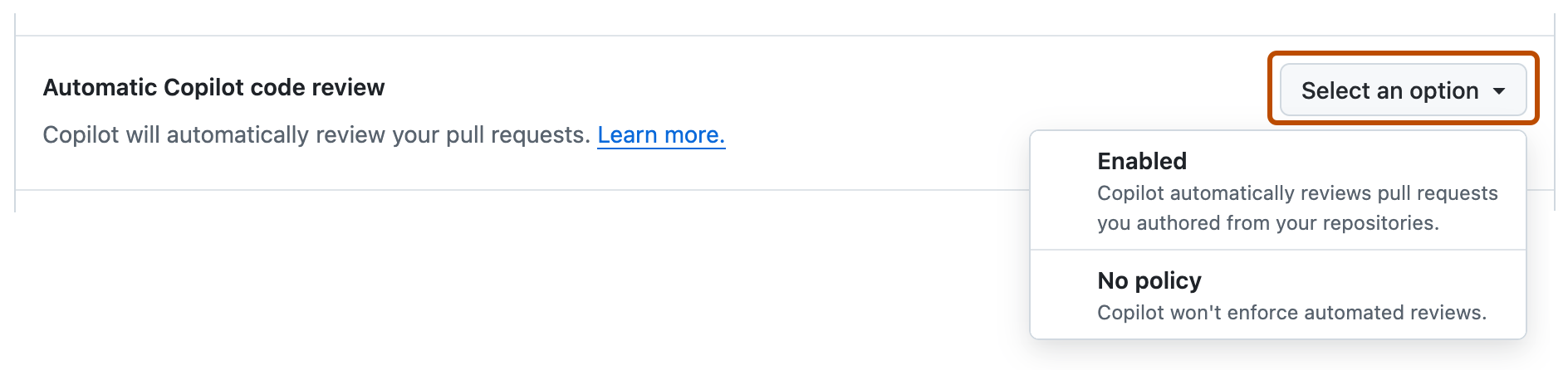
Read the two repository controls together
The configuration documentation directs repository administrators to Settings, Copilot, and Code review. Under Auto-approval, one control permits approving reviews; another lets those approvals satisfy merge requirements.
Optional file patterns constrain which pull requests receive that merge-counting treatment. GitHub says every changed file must match one of the configured globs. The current limit is 15 patterns; leaving the field blank allows all files. The empty state therefore deserves an intentional decision rather than a quick click past the form.
For an initial trial, choose a change category whose correctness you can verify directly. That might be a specific set of documentation pages maintained by your team. “Documentation” alone is not a guarantee of low impact: installation commands, access instructions, and generated configuration examples can affect real users.
Write down the approved scope in ordinary language and compare it with the patterns. The language describes your intention; the patterns determine what the feature actually selects. If those differ, fixing the prose will not fix the selection rule.
Organization policy can decide what repositories may enable
The release places control at enterprise, organization, and repository levels. Enterprise administrators can keep the feature disabled or delegate decisions. Organization settings can enable selected repositories, permit repository-level choice, enable broadly, or disable broadly. The documentation also describes enterprise selection of particular organizations.
Our recommended rollout starts with the owner who is accountable for the existing review policy. A repository administrator should know whether the setting is inherited and whether a local change is permitted. That avoids two teams testing different policy states while believing they are evaluating the same feature.
This is an ownership problem as much as a model-quality problem. Someone needs to decide which repositories enter the preview, inspect evidence from actual pull requests, and remove a path from scope when the result is unreliable. A named owner and a small scope are easier to maintain than a promise that everyone will remember to be careful.
Do not use the release date as a reason to enable the feature across an entire organization. The relevant evidence is whether the repository’s rules, tests, review expectations, and observed results make that specific configuration useful.
Requesting reviews automatically is its own configuration
GitHub documents automatic review through branch rulesets. Administrators can select target branches, request Copilot review, optionally review new pushes, and optionally review draft pull requests. Without the new-push option, the documented automatic-review behavior reviews a pull request once.
That distinction creates a practical question: what happens after an author changes the code? The launch notice says a new commit dismisses Copilot’s prior approval and a fresh review can be requested. Your workflow needs to make the current commit visible when evaluating whether the review requirement is satisfied.
Use a disposable demonstration pull request to inspect the whole sequence. Request a review, check its assessment and formal status, push a small additional commit, then inspect the result again. This is a suggested validation exercise; we did not execute an organization’s private settings for this guide.
Keep the test change simple enough that you can explain why each state occurred. If several bots, merge queues, and rules change simultaneously, a successful merge becomes difficult to attribute to any particular setting.
A review is useful only within its coverage
GitHub’s code-review overview describes an agent that can gather project context and suggest fixes. It also documents situations where unavailable runner capabilities result in a more limited review. The existence of a comment is therefore not a universal measurement of review depth.
For your own evaluation, select real examples of problems the review should catch: a broken boundary condition, a missing update to a dependent module, or a change that violates a documented repository convention. Include changes that should pass so that a system producing objections to everything does not look artificially effective.
Record whether the finding was correct, whether its suggested fix worked, and how much follow-up it required. Avoid reducing the exercise to comment count. More comments can mean broader coverage, duplicated advice, or noise. Our AI evals guide explains why the task and scoring rule need to be chosen together.
The same principle applies to approval. A useful result is a justified decision on an understood change, with the repository’s other requirements still visible. It is not merely a green badge arriving earlier.
What happens next
Our recommendation is to observe approval assessments on ordinary work before allowing them to count toward required reviews. Then enable a deliberately narrow scope and check representative pull requests, including a mixed-path change that should fall outside it.
Preserve the reason for each scope decision. If the repository adds a generated-code directory or moves an important configuration file under an allowed path, revisit the glob rather than assuming the original risk assessment still holds. Scope drift can change what the same saved setting means.
Because the capability remains a public preview, use current documentation when changing it and keep the configuration reviewable. The immediate benefit is a more explicit signal from Copilot. The larger benefit depends on how accurately your team connects that signal to its existing merge process.
Quick poll
Where would you first evaluate AI approvals?
Our take: observe the judgment, then decide which limited scope may count toward required reviews.
FAQ
Does a positive Copilot assessment count as approval? No. The assessment is a statement in the overview comment. A formal approval and permission for it to count toward merge requirements are separate matters.
Is automatic approval on by default? No. GitHub says approval submission is disabled by default and administrators control it at several levels.
What if a pull request changes an unapproved path? The documented path restriction counts approval only when every changed file matches one of the allowed patterns. Test mixed-path changes when validating the configuration.
What happens after another commit is pushed? GitHub’s launch notice says Copilot’s existing approval is dismissed. Request a fresh review and inspect the requirements for the updated pull request.


.jpg)
