Key Takeaways
- Individual-user budget expiration became generally available on September 1 for Copilot Business and Enterprise.
- Expiration removes the override; the next applicable per-user limit becomes effective.
- User-level caps cover consumption from both pooled credits and metered usage, while broader spending budgets serve different purposes.
- Check the effective fallback and paid-usage settings before treating a temporary exception as financially contained.

GitHub now lets an individual Copilot user budget expire automatically. The important detail is what happens afterward: GitHub removes the individual override and applies a broader user budget if one exists. Without a cost-center per-user budget or universal user budget, that person has no remaining user-level cap.
For Business and Enterprise administrators, this is useful for temporary extra capacity during a project. Before setting the date, inspect the fallback and the separate controls for paid usage. An expiration date is a cleanup instruction, not a promise that spending will stop on that date.
Hero: Hack Club's Undercity event at GitHub headquarters, July 2025. Archive context photo by Celesteroselli, Wikimedia Commons, CC BY-SA 4.0. Cropped and resized to 1600×900 under the same license; billing controls are not shown.
The date removes an exception; it does not freeze an account
GitHub’s release notice offers three choices: retain the budget indefinitely, remove it at the next billing-cycle boundary, or remove it on a specific date. Administrators can change or clear an expiration later. The default remains no expiration.
This solves a recognizable problem: a developer needs additional AI capacity for a defined task, an administrator raises the limit, and the exception survives because nobody remembers to clean it up. Automatic removal helps with that maintenance step.
However, removal can either tighten or loosen a person’s effective limit. A temporary high allowance might return to a lower default. A temporary restrictive allowance might disappear into a more generous default. If there is no broader user-level rule, the individual cap simply goes away. The direction depends on your configuration.
Our recommendation is to write two amounts in the change record: the effective allowance while the override exists and the effective allowance afterward. If the second entry is “none configured,” resolve whether that is intentional before saving the expiration.
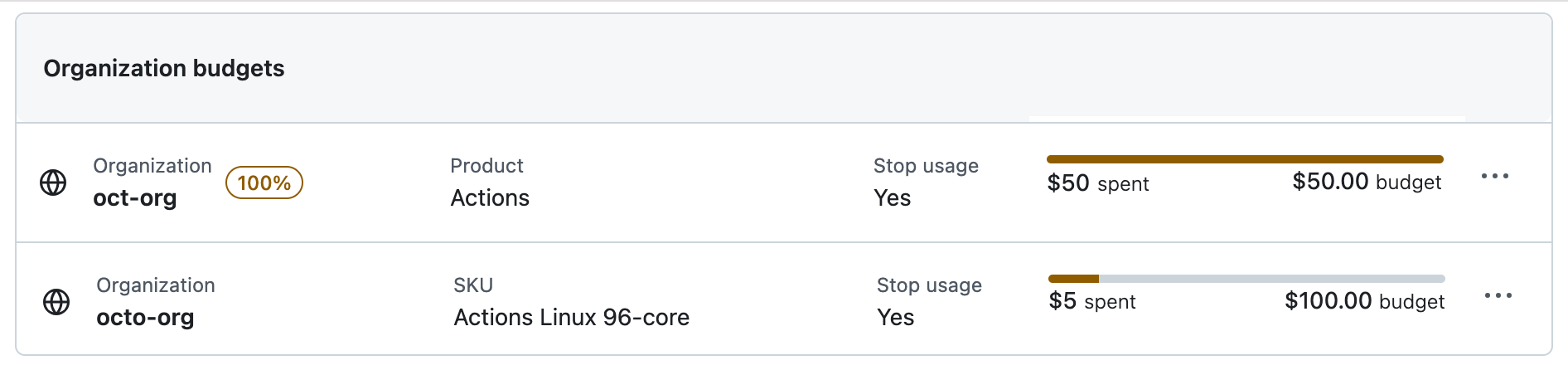
Follow the per-user hierarchy in the right order
The usage-based billing documentation defines three per-user levels. An individual budget takes precedence over a cost-center per-user budget, which takes precedence over a universal per-user budget. These are alternatives within that hierarchy, rather than three allowances a person can add together.
The cost-center wording deserves attention. A cost-center per-user budget sets an amount for each member. A cost-center spending budget concerns the team’s metered charges. They can coexist because they answer different questions.
Consider an illustrative case: a team’s normal per-person AI-credit consumption cap is $40, and a temporary individual cap is $80. On expiration, the person returns to the applicable $40 rule. These are hypothetical budget amounts, not subscription prices or a recommendation for your organization’s spending level.
Now remove that team default and the universal default from the example. The same expiration no longer restores a $40 cap. This is why reviewing only the individual budget form misses the most important part of the change.
Separate credit consumption from additional charges
GitHub says user-level budgets cap total AI-credit consumption across both the shared pool and metered phases, and enforce a hard stop. Broader cost-center, organization, and enterprise budgets address metered charges after the pool is exhausted. Increasing one type does not automatically override the other.
The practical implication is that a user can be blocked even when another budget still has room. Conversely, a budget shown in a billing dashboard may cover additional charges without placing the per-person limit you intended on the shared pool.
The budget setup guide warns that relevant metered-product budgets can function as notifications unless the stop-usage option is enabled. The user-level rules described above always stop usage; do not copy an assumption from one budget category into another.
For a useful internal summary, separate four questions: what is already included, what one person may consume, whether paid overage is permitted, and how much additional spending the organization will accept. A single number labeled “AI budget” can hide all four decisions.
Our coding-assistant comparison helps with product fit. Budget controls are the follow-through that makes a selected tool manageable once usage grows beyond one person.
Configure the exception from a known baseline
In GitHub’s documented interface, administrators open Billing & Licensing, then Budgets and alerts. For a user-level limit, select the relevant bundled AI-credit budget type and user scope, identify the person, and choose the optional expiration. The date choice appears for a specific user’s budget.
Before applying it, inspect the user’s current cost-center assignment and the existing universal rule. Also confirm who requested the exception and which task it supports. The point is not paperwork for its own sake; it is to prevent the next administrator from confusing a deliberate temporary allowance with an unexplained permanent entitlement.
After saving, read back the budget. Verify the user, amount, scope, and expiration rather than relying on a success message alone. Keep the budget identifier with the change record so that a later update targets the same object.
A small pilot should include a person with a cost-center default and a person relying on the universal default. If your organization intentionally has neither, include that case too. Those scenarios test the fallback structure, not just whether a date field accepts input.
API automation needs the same review
GitHub exposes expiration through expires_at in its Budgets REST API. The documented value uses YYYY-MM-DD, accepts a future date, and applies only to individual user scope. The API documentation also calls out the required username field for a user-scoped budget.
If you automate these changes, first retrieve the existing budgets and resolve the exact user and object. A script should distinguish a missing override from a missing baseline. They have different implications even if both appear as an empty search result in a loosely written tool.
Our recommended automation record contains the prior configuration, requested modification, returned identifier, and independently retrieved result. If a request fails or times out, inspect the current object before blindly creating another override. That avoids duplicate administrative state and makes the outcome easier to explain.
Do not turn this release into a script that raises everyone’s allowance until next month. The useful unit is an explicit exception for a specific person with an understood fallback, backed by the organization’s actual spending policy.
What happens next
Start by reviewing existing individual overrides. Add expiration only where the exception really is temporary and the fallback is suitable. For recurring role-based needs, a cost-center per-user default may be easier to understand than a collection of individual exceptions with rolling dates.
Measure whether the exception helped complete useful work. Raw AI-credit consumption is an input to that judgment, not the result. Record the task outcome and necessary human follow-up alongside the consumption change, following the task-based approach in our AI evals guide.
The immediate operational win is fewer forgotten overrides. The more valuable outcome is an allowance structure that an administrator can explain without reconstructing months of chat messages. Expiration supports that structure when the rule that remains afterward is intentional.
Quick poll
What makes AI spending hardest to manage?
Our take: inspect the post-expiration rule before adding a date to an individual override.
FAQ
Does budget expiration disable Copilot? Not automatically. It removes the individual override. GitHub then applies the next relevant per-user budget, if one exists, alongside other applicable controls.
Can a universal user budget have this expiration? GitHub documents expiration for individual user-level budgets only. The feature does not add expiration to universal or cost-center per-user budgets.
Can I change the expiration later? Yes. The release says administrators can change or clear it. Confirm the saved object and effective fallback after editing.
Will raising the enterprise budget unblock every user? No. GitHub documents user-level budgets as separate hard caps. A person who exhausted that cap can remain blocked even if a broader spending budget has capacity.