Key Takeaways
- HydraFusion launched September 4 as an experimental Copilot CLI option, available across Copilot plans.
- It selects among a direct answer, escalation to a stronger model, and an independent critique followed by revision.
- Published results measure complete estimated workflow cost, including extra model calls; they are not a guaranteed bill reduction.
- Start with a bounded task whose finished code and tests can be evaluated independently.

GitHub’s HydraFusion research preview chooses how a coding task should be solved, as well as which models should handle it. It can use one model, escalate an initial attempt, or ask a separate model to critique a draft before revision.
That is a useful experiment for a substantial, clearly specified coding task. It is not yet evidence that every long coding conversation will become cheaper or more reliable. GitHub recommends starting with first-turn, single-prompt tasks, and its published savings come from controlled offline evaluations.
Hero: Microsoft's west campus in Redmond, photographed in August 2009. Microsoft is GitHub's parent company; this archive context photograph does not depict HydraFusion. Photo by Jelson25, source, Public domain. Cropped and resized by ToolSurge.
Routing a task is different from routing its execution
In an ordinary model picker, you select the model you want to use. Copilot’s Auto documentation describes a system that considers task complexity and model availability when choosing a model. It also says routing respects applicable plan and policy restrictions.
HydraFusion’s launch describes a broader decision: construct an execution pattern for the task. An economical model may be sufficient by itself. A harder task might need an escalation. Another might benefit most from a separate critic that evaluates the first attempt.
The reader-facing difference is what you are evaluating. Comparing one model’s first answer with another model’s first answer asks which model performs better. Comparing HydraFusion with your usual workflow asks whether the complete sequence produces a useful result at an acceptable cost and delay.
That distinction builds on our coding-assistant comparison, but it changes the unit of comparison. The product is orchestrating work, not simply placing another model name in a menu.
The three patterns answer different failure modes
GitHub names the patterns Single, Cascade, and Critique. In Single, one selected model solves the task. In Cascade, an initial model attempts a solution and an acceptance check determines whether to escalate. In Critique, another model family reviews a draft in a read-only role and the original model revises once.
Our interpretation is that these target different kinds of waste. A straightforward task does not necessarily benefit from several agents debating it. A difficult task may justify a stronger solver. A plausible but flawed draft may benefit more from an independent objection than from repeating the original approach.
None of those patterns makes the task definition optional. If you ask for “a better dashboard” without defining what should change, a multi-model workflow can spend more effort interpreting the same ambiguous request. Specify the affected behavior, the constraint that matters, and the evidence that would demonstrate completion.
For example, a good trial could ask an agent to fix a reproducible date-parsing bug, preserve existing inputs, and add a regression test. The result has an observable target. A request to make the entire application “production ready” is much harder to score and provides little information about which execution pattern helped.
Read the benchmark tradeoff, not only the largest saving
GitHub reports three comparisons with an Opus 5 baseline. On TerminalBench 2.1, its selected configuration achieved 4.9 percentage points higher verified task quality at 67% lower estimated cost. On DeepSWE, quality was 1.5 points lower at 36% lower cost. On its internal CheckpointBench, quality was 0.1 points lower at 65% lower cost.
The company says the evaluation used matched inputs and conditions, medium reasoning, and accounting for every invoked stage. It also states that the results depend on the benchmark revisions, model pool, configuration, and pricing assumptions. These are vendor-run experiments, not our independent measurements or a promise about your repository.
The mixed quality results matter. A lower cost with almost unchanged completion may be attractive for one task, while a small decline in correctness may be unacceptable for another. Do not flatten those choices into a headline that says the system wins at everything.
Our AI evals guide recommends choosing the scoring rule before comparing tools. For this preview, include a correct final result, required review effort, elapsed time, and the cost of failed attempts. An inexpensive unsuccessful run has not completed the work.
Enable the preview in a workspace you understand
The launch gives this Copilot CLI sequence:
/update
/experimental on
/model
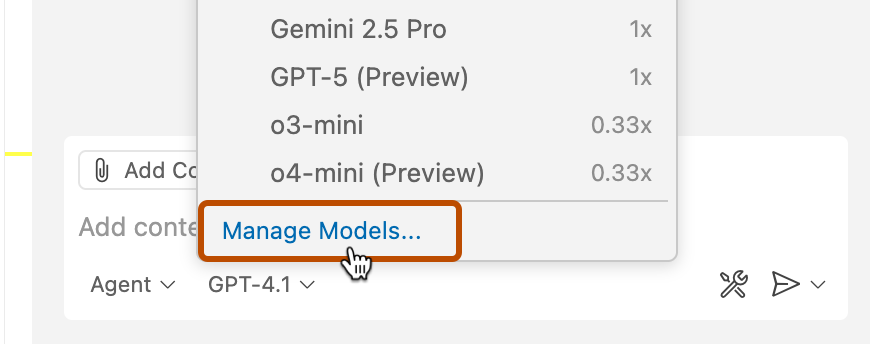
Then select the HydraFusion research-preview entry. This is the documented setup sequence, not a command we ran against a reader’s account. GitHub’s CLI guide says organization-provided access also depends on the organization’s CLI policy.
Begin in a repository you already understand. Copilot CLI asks about trusting the working directory, and its normal tool permissions remain relevant. The launch describes isolated, tool-less review steps and solver steps that use the ordinary permission-aware workflow. Adding an independent critic is not a reason to grant a coding tool access to unrelated directories.
Our suggested trial starts from a known code state with a clearly failing example. Record what must remain unchanged. After the run, inspect the changed files and execute the project’s relevant checks. The preview should make that work more effective, not remove the need to know what changed.
Extra calls and slower visibility are real tradeoffs
The launch says the developer sees workflow stages while intermediate drafts are withheld until there is one coherent result. That can avoid presenting discarded work as final, but it can also make waiting feel less informative.
If your task requires frequent steering, notice how much useful feedback you receive before completion. A workflow that performs well on a single complete prompt may fit differently into a conversation where requirements change repeatedly. GitHub explicitly identifies longer multi-turn performance as an area for further work.
Billing also follows the work performed. The launch says tokens are charged at the rates of the models used, and links to Copilot’s model pricing reference. Do not assume another mode’s discount or a single model’s price automatically describes a compound run.
When evaluating cost, keep the task boundary consistent. If your baseline needs several manual retries, include them. If HydraFusion produces a result that needs substantial follow-up, include that too. Comparing one incomplete attempt with a completed workflow can make either tool look misleadingly cheap.
What happens next
Use a small set of distinct real tasks: a reproducible bug, a narrow feature, and a cleanup with a measurable constraint. Choose them because they represent your work, not because they are likely to flatter the new feature. Keep their starting conditions and acceptance criteria available for review.
After each result, ask which part of the workflow mattered. Did escalation resolve a failure? Did the critic catch a defect? Did a direct run finish with less overhead? You may find that the feature is valuable for one class of task and unnecessary for another.
HydraFusion’s strongest idea is selective additional effort. Its value for a team will come from evidence about completed tasks, while the preview continues to change. The launch makes that experiment available; your own workload determines whether it belongs in the regular workflow.
Quick poll
Which coding task most needs another perspective?
Our take: score the completed task, including follow-up, when comparing compound workflows.
FAQ
Is HydraFusion a new foundation model? GitHub describes it as runtime orchestration across models. It selects an execution pattern and participating models for the task.
Is it the same as choosing Auto? No. Auto selects suitable models; HydraFusion’s preview can also construct a draft, escalation, or critique-and-revision workflow.
Does the 67% saving apply to my bill? That figure belongs to GitHub’s TerminalBench comparison. Your task, models, retries, and pricing conditions determine actual cost.
What task should I try first? GitHub recommends substantial, well-scoped, first-turn coding tasks. Choose one with a result and verification steps you can assess yourself.